

A few years after G3 became OpenSees, UCFyber became XTRACT. In those intervening years, to accommodate section data exported from UCFyber, we added the fiber command to OpenSees, allowing you to add a single fiber to a section based on the fiber’s (y,z) coordinates, area, and material tag.
Several section analysis software packages have sprung up since XTRACT. One package that recently caught my attention is sectionproperties, which uses finite element analysis to compute elastic and plastic section properties.
As far as I can tell, you cannot use sectionproperties for general moment-curvature analysis like you can with XTRACT or OpenSees. But that’s not a big deal–what you really want out of sectionproperties is the section discretization.
The sectionproperties package has a large section library. For example, you can easily create a wide flange section, e.g., a W12x14, including fillet rounds.
from sectionproperties.analysis import Section
from sectionproperties.pre.library import i_section

# W12x14
geom = i_section(d=11.9, b=3.97, t_f=0.225, t_w=0.2, r=0.3, n_r=4) # Four points along each fillet round
geom.create_mesh(mesh_sizes=0.5) # Maximum element size

sec = Section(geometry=geom)
sec.plot_mesh(title='W12x14',materials=False)
The resulting cross-section triangulation is shown below.
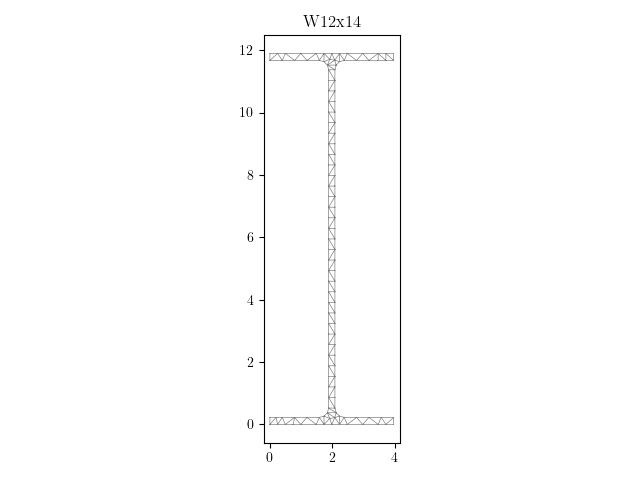
This is more fibers than necessary for most earthquake engineering applications, but let’s go with it. There are several options in sectionproperties to use a coarser mesh and to break sections up into regions. You can also define arbitrary sections like you would using the patch command in OpenSees.
For any section geometry, the coordinates and area of each fiber can be saved to a file using the to_fibre_section function.
from sectionproperties.post.fibre import to_fibre_section

fiberfile = 'W12x14.txt'
to_fibre_section(geom, analysis_type="3D", save_to=fiberfile)
The format of the saved file is compatible with suanPan, an open source FEA package similar to OpenSees. After the header notes and the section information, there is a list of fibers, one per line, each line beginning with section Cell3D followed by an id, the section area, the material tag (default in this case), then the x and y coordinates of the fiber.
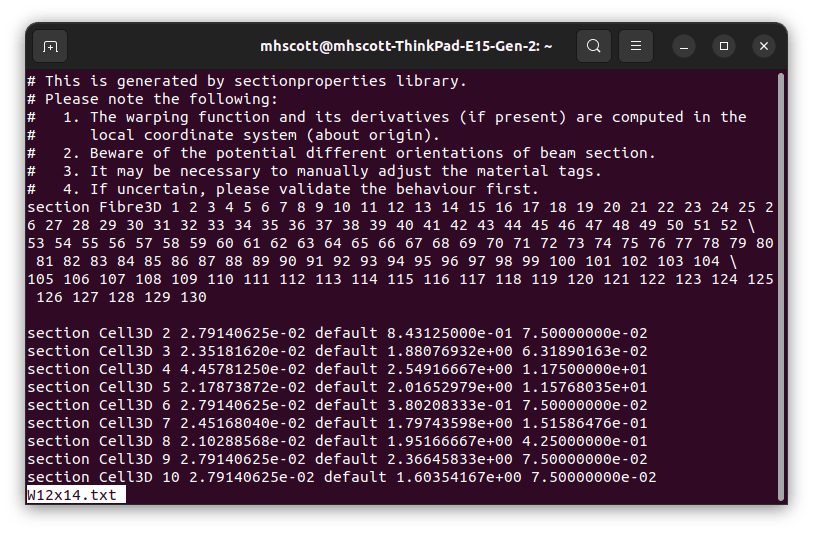
Reading this information into an OpenSees fiber section is straightforward. Just note that x from sectionproperties is z in OpenSees.
E = 29000
matTag = 8
ops.uniaxialMaterial('Elastic',matTag,E)

ops.section('Fiber',1)
with open(fiberfile) as file:
    for line in file:
        if line.startswith('#'):
           continue
        line = line.rstrip()
        line = line.split(' ')
        if line[0] == 'section' and line[1] == 'Cell3D':
            A = float(line[3])
            z = float(line[5])
            y = float(line[6])
            ops.fiber(y,z,A,matTag)
Note that I’m managing the material definition directly in OpenSees, ignoring the default material id in the fiber section output. You can also define different materials in sectionproperties and have the material id exported with each fiber.
And if you need to rotate asymmetric sections, e.g., a channel, you can adjust the local axes of the element, e.g., via the vector in the x-z plane for frame elements. You never need to explicitly rotate section coordinates.
There’s probably better ways to get fiber information out of sectionproperties. And there’s probably more efficient ways to parse the section data file. But this approach works and conveys how to define an OpenSees fiber section one fiber at a time from the highly sophisticated sectionproperties Python package.
If you need yet another reason to switch from OpenSees.exe (Tcl) to OpenSeesPy, easy integration with sectionproperties is it. Give the package a try!
 Portwood Digital
Very useful information, thank you Prof. Scott!
LikeLiked by 1 person
The same author of the “SectionProperties” package has also developed a rather nice reinforced concrete section analysis package aptly named “ConcreteProperties”. I’d recommend that too if you’re interested (although it is somewhat aimed at AS/NZ design codes).
LikeLiked by 1 person
Thanks for the tip! I’ll take a look. I’m sure, like
sectionproperties, there’s some sophistication that would work well with OpenSees.LikeLike
When I need to do mesh, my choice is gmsh. One can use it in c++, python. It was developped in Belgium.
Gmsh: a three-dimensional finite element mesh generator with built-in pre- and post-processing facilities
LikeLike
I’m pretty sure tools to link gmsh with OpenSees have been developed. Not sure how well the tools work, never tried them!
LikeLike
Thanks for the info. Is it possible to visualize the section for verification? Cannot get opsvis plot command to work for fiber section.
LikeLike
You can use the eleResponse command to get fiber data then plot.
LikeLike