

It is fairly well known that you can use a single force-based element to simulate the material nonlinear response of a frame member. Likewise, using a corotational mesh of displacement-based elements is an effective approach to simulate combined material and geometric nonlinearity.
A previous post looked at geometric nonlinearity with linear-elastic response in a single element. But using only one element per frame member to represent both material and geometric nonlinearity is a sort of holy grail for OpenSees analyses.
OpenSees has three frame element formulations that are capable of simulating material and geometric nonlinear response within the basic system:
dispBeamColumnNL– uses Green-Lagrange strain and accounts for moderate rotations in the element displacement fieldforceBeamColumnCBDI– uses Lagrange polynomials to approximate the element displacement field from curvatures at the integration pointsmixedBeamColumn– enforces strong equilibrium like the force-based formulation, but assumes a shape function for the element displacement field
When I first set out to write this post and compare these three element formulations, I picked what turned out to be a moderately difficult problem. So, I went back to (and modified) a standard test problem for geometric nonlinearity. The model is a simply-supported beam with an eccentric axial load applied at one end.

The beam is W14x90 with bilinear stress-strain response where E=29000 ksi and Fy=36 ksi with 5% strain-hardening ratio. Yeah, the strain-hardening is pretty high, but it let’s us crank in a lot of load and see the effects of combined material and geometric nonlinearity.
Five Gauss-Legendre points are used in each element formulation and each section is discretized into 6 web fibers and 4 fibers in each flange. The peak axial load is 0.8EI/L2 with eccentricity equal to half the section depth.
import openseespy.opensees as ops

kip = 1
inch = 1
ksi = kip/inch**2

L = 200*inch
E = 29000*ksi
Fy = 36*ksi
alpha = 0.05
H = alpha/(1-alpha)*E

# W14x90
d = 14*inch
bf = 14.5*inch
tw = 0.44*inch
tf = 0.71*inch
I = 999*inch**4

# Load and eccentricity
Pmax = 0.8*E*I/L**2
e = 0.5*d

ops.wipe()
ops.model('basic','-ndm',2,'-ndf',3)

ops.node(1,0,0); ops.fix(1,1,1,0)
ops.node(2,L,0); ops.fix(2,0,1,0)

ops.uniaxialMaterial('Hardening',1,E,Fy,H,0)
ops.section('WFSection2d',1,1,d,tw,bf,tf,6,4)

ops.beamIntegration('Legendre',1,1,5)

ops.geomTransf('Linear',1)

ops.element('mixedBeamColumn',1,1,2,1,1,'-geomNonlinear')
# ops.element('forceBeamColumnCBDI',1,1,2,1,1)
# ops.element('dispBeamColumnNL',1,1,2,1,1)

ops.timeSeries('Linear',1,'-factor',Pmax)
ops.pattern('Plain',1,1)
ops.load(2,-1,0,e)

tmax = 1
Nsteps = 100
dt = tmax/Nsteps

ops.system('UmfPack')
ops.test('NormDispIncr',1e-8,10,0)
ops.integrator('LoadControl',dt)
ops.analysis('Static','-noWarnings')

for i in range(Nsteps):
    ops.analyze(1)
For each element formulation, the computed response is compared to the response obtained using one element of the formulation’s geometrically linear counterpart (dispBeamColumnNL to dispBeamColumn; forceBeamColumnCBDI to forceBeamColumn; and mixedBeamColumn with and without the -geomNonlinear option) as well as the exact solution. And by “exact solution” I mean the response obtained using a fine corotational mesh of displacement-based elements.
Note that the plastic axial load for this beam is 954 kip and the yield moment is 430 kip-ft. The beam yields at an applied axial load under 450 kip, with corresponding applied moment of about 260 kip-ft, indicating a high amount of axial-moment interaction.
The computed axial load-rotation results are shown below for the displacement-based formulations. As expected, the single element solutions are stiffer and stronger post-yield compared to the exact solution.

The computed results for the force-based formulations are shown below. The geometrically nonlinear CBDI formulation is close to the exact solution.
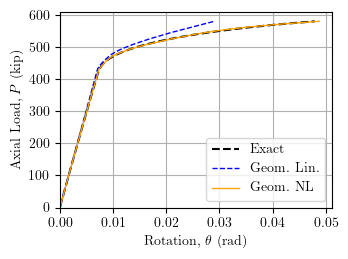
Finally, the computed axial load-rotation results are shown below for hte mixed formulations. The geometrically nonlinear formulation agrees with the exact solution.
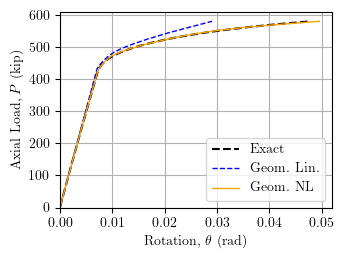
While you can capture some geometric nonlinearity with a single dispBeamColumnNL element, you are better off to use either the forceBeamColumnCBDI or mixedBeamColumn (with -geomNonlinear option) if you would like to simulate combined material and geometric nonlinear with a single frame element.
 Portwood Digital